

Overview
The Overview tab is the landing page for an agent. It lists all workflow sessions grouped by status — Active, Completed, Failed, and Halted.
Access via Agent Detail → Overview tab.
Active Sessions
Active sessions update in real time, showing the current step and running duration as the agent executes.
| Field | Description |
|---|---|
| Workflow Name | Name of the workflow (e.g., agent-workflow) |
| Run ID | Unique execution instance ID |
| Intent | Detected intent for the session |
| Current Step | Activity currently executing (e.g., "agent_toolPlanner") |
| Started | When the session started (e.g., 3 days ago) |
| Duration | Running time (e.g., 90h 20m) |
| Events / LLM / Tools / Policy | Count of events, LLM calls, tool calls, and policy evaluations |
Click Details on the right bar of each agent session to open the session in the Verify tab, where you can view the full execution evidence and event log timeline.
Completed Sessions
- Workflow name
- Start and end timestamps with duration (e.g.,
02/12/2026, 06:29 UTC → 06:32 UTC (3m 31s)) - Event count
Failed Sessions
Sessions that ended with an error. Each card shows the workflow name, timestamps, and error details.
Halted Sessions
Sessions terminated by a governance decision. Each card shows:
- Workflow name and run ID
- Time since halt
- Violation type (e.g.,
Validation failed for field with errors,Behavioral violation) - Error message
Terminating a Session
Each active session card includes a Terminate link alongside the Details link.

Clicking Terminate opens a confirmation dialog warning that this is a destructive, irreversible action.
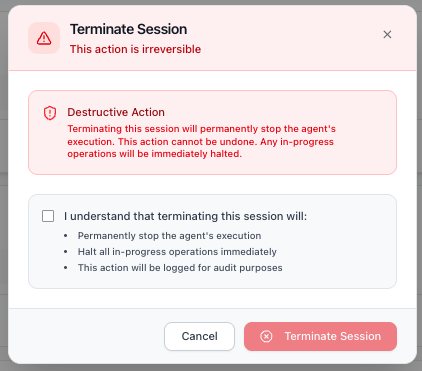
Before confirming, you must acknowledge a checkbox confirming that terminating the session will:
- Permanently stop the agent's execution
- Halt all in-progress operations immediately
- Be logged for audit purposes
Click Terminate Session to proceed, or Cancel to return to the Overview page. Once terminated, the session moves to the Halted Sessions section.
Next Steps
- Assess Your Agent's Risk - Configure the risk profile for this agent
- Understand the Trust Lifecycle - Learn how the 5 phases work together